How Game Save Compatibility Keeps Old Saves Working
Have you ever wondered how an update can entirely rework skill trees, rebalance loot drops, and rewrite core code without breaking your current playthrough? It’s not just luck. Ensuring game save compatibility takes serious foresight. Devs actually have to write specific routines to catch the outdated data from your previous sessions and bridge the gap, translating it so the newly updated game knows exactly what to do.
How Game Save Compatibility Survives an Update
Think of a save file as a completely separate entity from the game’s actual engine. Whenever a browser fetches a shiny new version of a game, it might grab completely rewritten scripts, fresh art, and updated menus, all without ever touching your personal progress. The updated game just has to know how to read your old data. Nailing game save compatibility means developers have to anticipate that their current data layouts won't last forever.
Let’s say an early version logged your health as hp: 80, but a massive update splits that into currentHealth: 80 and maxHealth: 100. The new game code can't just assume every returning player magically has those updated fields. The devs have to build in a translation layer—either catching that outdated stat and reading it anyway, or automatically upgrading it during the loading screen.
This is why changing the game and changing the save are two different operations. Updating a sword's artwork might require no save changes whatsoever. Replacing the entire inventory system probably will. Developers therefore have to think about both the files being shipped to players and the persistent information players already possess. Otherwise, a harmless-looking update can greet an old save with the digital equivalent of "Who are you, and why are you carrying 47 cabbages?"
What Browser Game Save Data Actually Stores
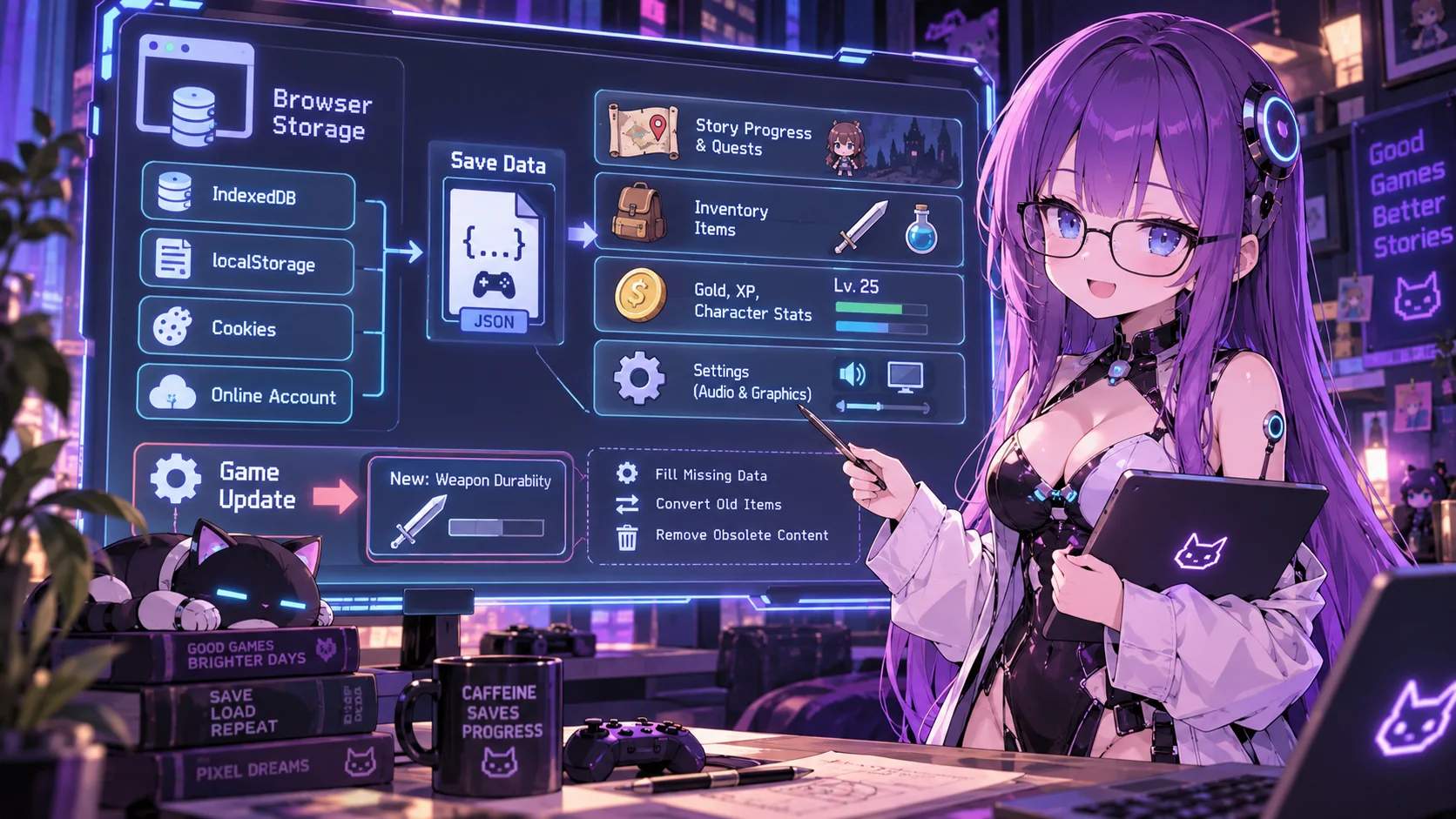
To keep you from starting over every time you play, your browser game save data has to stash your progress somewhere. Depending on the game, progress may live in browser storage such as IndexedDB or localStorage, or on a server tied to your account. A game can also use both: your keybindings might stay in this browser while your multiplayer rank lives on a remote server.
Think of a save file as a highly organized checklist (frequently written in JSON) that tells the game exactly what you’ve been up to. This blueprint keeps tabs on:
- Your exact spot in the main plot and side quests.
- Everything currently sitting in your backpack.
- Your gold, XP, and overall character strength.
- Your personal tweaks to audio and graphics.
Think of this data as the bridge between you and the game itself. Now, throw a massive patch into the mix—an absolute nightmare for devs. Let's say they just patched in a new element like weapon durability, but your old save only logged the weapon's basic name. Suddenly, your file is missing crucial data. The game has to instantly fill in those blanks, port your old weapons into the new mechanics, and silently trash items that don't exist anymore.
Version Numbers and How HTML5 Games Run Save Migrations
One of the simplest ways to manage old formats is to give the save data its own version number. A save might contain something like saveVersion: 3, while the current game expects version 5. When loading that file, the game can immediately tell that some conversion work needs to happen before normal gameplay begins.
Developers commonly handle this with migration functions. Instead of trying to convert every historical format directly into the newest one, the game can perform migrations sequentially: version 3 becomes version 4, then version 4 becomes version 5. Each function handles one known change. This makes the process easier to test because the developer knows exactly what assumptions each migration is allowed to make.
That process is also part of understanding how HTML5 games run after an update. The browser may execute the newest JavaScript immediately, but that JavaScript can still recognize data written months or years earlier. A game might load an old object, inspect its version, migrate the structure, validate the result, and only then hand it to the current game systems. The running code is new. The player's history does not have to be.
Renames, Removals, and Updates on Platforms like Lewdspot
Renaming data is one of the easiest compatibility problems to understand. Suppose an older save uses goldCoins, but the economy is redesigned and the current game expects credits. A migration can copy the old value into the new field, remove the obsolete one, and continue. More complicated changes may require several fields to be combined, split apart, or recalculated.
Figuring out what to do with deleted game files is a nightmare. When a weapon gets patched out, the developers have to figure out a band-aid—maybe they give you a similar sword, refund your in-game cash, hide the original code so it doesn't break, or just snatch it from your inventory. Cut story missions are an even bigger mess. You end up with ghost data like triggered cutscenes or open gates, forcing the system to frantically sort out which pieces of the old save mean anything anymore.
On a browser-game platform such as Lewdspot, individual games can be updated while players continue returning through the same website. However, the platform itself does not determine how every game's old saves are converted. Save handling still depends on how each game's developer designed its storage format, migration logic, and update process.
Why Browser Cache Is Not a Save Migration System
Caching is built to handle a completely different issue. Basically, browsers stash away your static assets—stuff like images, audio, CSS, and JS files—so they don't have to waste time downloading them over and over. Devs manage these cached files using versioned names, service workers, or HTTP rules to swap in fresh versions. Your game progress is a separate kind of data, even when it also lives on your device.
A locally stored save may live in localStorage or IndexedDB rather than the cache used for scripts and art. So, if you refresh and download the latest game update, that fresh code doesn't automatically rewrite your old save file unless the devs specifically programmed it to. That’s why clearing cached files alone usually will not repair a broken save.
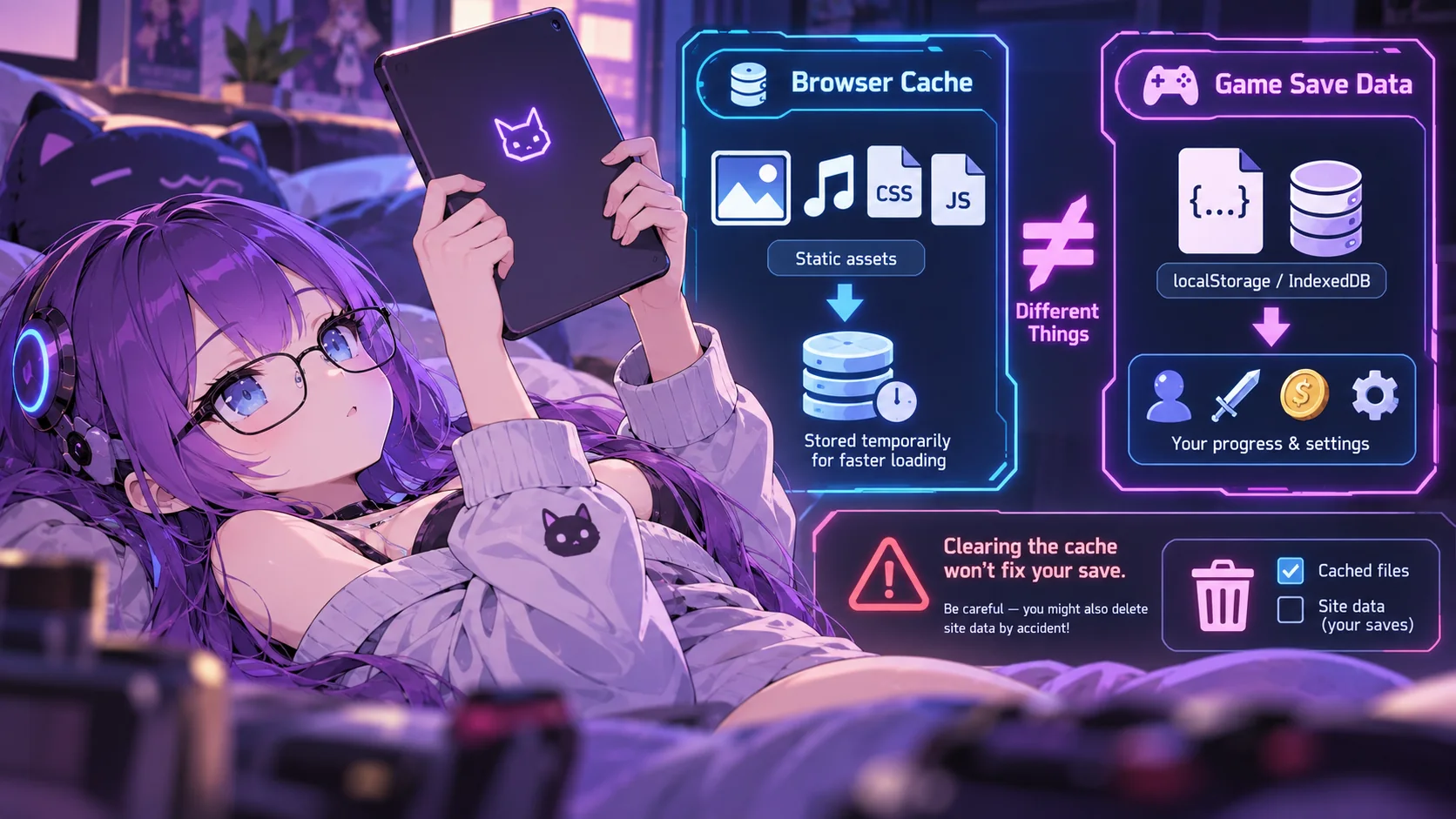
Clearing cached files can make your browser fetch fresh game assets, which may help with a stale script but will not fix a corrupted save. Check the settings carefully: some browser cleanup options also delete site data. If your progress is stored only in that browser and you have no backup, deleting the site data could erase it—which hurts way more than waiting for a background texture to reload.
Backups, Failed Migrations, and the Limits of Rolling Back
Since updating data is risky, developers should back it up before a major transition. One safer approach is to duplicate a save, migrate the copy, validate the result, and only then replace the original. Online games may use database snapshots or backups for a similar safety net, but the exact safeguards vary by game.
Good code also expects messy save files. A player might be missing items, have glitched stats, or be on a forgotten older patch. Instead of blindly trusting the file, a solid update script checks for missing info, uses safe fallbacks, and pulls the plug if things look sketchy. You don't want an update failing halfway through. That leaves you with a mangled save stuck between two versions, which ruins the game entirely.
Rolling the game itself back does not necessarily solve that problem. If version 5 permanently converted a version 4 save into a new structure, reinstalling or loading version 4 code may give the older game a save it no longer recognizes. Removed content creates another limit. Even if the old save remembers an item or quest, the current build may no longer contain the scripts or assets required to restore it. Reliable rollback therefore usually requires both an older game build and a compatible backup of the save from before migration.
Updates Can Change the Game Without Losing the Save
Games can change substantially without throwing away existing progress because developers treat saved data as something that needs its own compatibility plan. Stable schemas, explicit save-version numbers, migration functions, sensible defaults, and careful handling of renamed or removed content all help newer code understand information created by older versions.
If you're a developer, having a backup is basically your safety net, especially when tweaking data permanently. You can't realistically expect a file from version 1.0 to plug perfectly into version 5.0 forever. But if a patch goes wrong, you at least have a fallback. The more you overhaul your game, the more you'll need that safety net.
At the end of the day, keeping old save files alive is on the devs, not the browser. Browsers are great at refreshing scripts and clearing caches, but they have no idea how to turn last year's "gold" into today's "gems." They're the ones who have to write that migration logic, test it thoroughly, and keep it running.