Ren'Py Browser Game: What Changes From Desktop?

Exporting a visual novel for the web seems like a dream for instant playability.
You click one button in the launcher, upload a zip file online, and suddenly anyone can play your story directly in Chrome or Safari. It sounds completely effortless on paper.
In reality, converting your desktop project into a Ren'Py browser game changes how Python executes, how assets load, and how browser storage behaves.
There are severe technical limits sitting behind that simple web export button.
That Dreaded First Loading Screen
On desktop, players download a build, launch it, and load its assets from local storage. When that same project moves to the browser, the situation changes quite a bit.
When someone opens your project in a browser, the browser has to download the WebAssembly engine and the game resources required to start playing. Ren'Py can progressively download additional assets as they're needed, reducing the initial loading time.
Does it really matter to consider download speeds?
It is easy to underestimate how much the first download affects a web release. Some players may abandon a game if the initial download is too large, particularly on slower connections or platforms where users expect quick access. This matters even more on browser-game portals, where players often expect a game to start quickly.
Sure, progressive downloading helps grab story files as people play through your scenes. But each element in the game has to arrive at the device firsthand. That is why compressing your file sizes beforehand is so critical for a fluent experience.
Python Under the Hood of a Browser Ren'Py Project
Desktop Ren'Py runs on a full CPython interpreter with direct access to operating system threads, local file systems, and external libraries. A web build runs a WebAssembly version of Ren'Py inside the browser, which changes what Python code and platform APIs are available.
So what actually breaks when you hit export?
The web build does not support multithreading, so desktop-style background image preloading is limited. It is also important to know that arbitrary socket networking and libraries such as requests aren't supported in the web build. For HTTP/HTTPS requests, Ren'Py offers renpy.fetch(), subject to browser security rules such as CORS. Live2D isn't supported by the web version either.
I always advise developers to audit their custom Python scripts early when preparing a project for the web. Features that rely on threading, direct file access, unsupported libraries, or desktop-specific system functions may need to be changed or removed.
The browser version works inside a much more restricted environment than a downloadable Ren'Py game, so it is usually better to keep custom systems as simple and browser-friendly as possible. A feature that works perfectly on desktop does not automatically behave the same way after a web export.
The Browser Storage Local Save Trap
Saving progress on a desktop computer means writing a small file to the user's hard drive. On the web, Ren'Py stores save and persistent data in browser-managed storage rather than the normal desktop save directory.
How do you protect your player progress from vanishing into thin air?
Clearing site data can remove locally stored saves. A private tab may not have access to saves in your regular browser profile, but opening one does not erase those saves. Storage limits and privacy settings also vary by browser. Every extra save slot takes up room, especially when screenshot thumbnails add to its size. Test saving on actual phones and desktop browsers before assuming progress will persist everywhere.
So how do you stop players from losing twenty hours of reading progress?
A few simple precautions can save your community a lot of heartache:
- Point readers to save exports: Ren'Py web builds include an Export saves option in the built-in hamburger menu; test that it works in your published build.
- Put up a clear warning: Tell readers that clearing site data may remove locally stored saves, and recommend exporting a backup first.
- Shrink thumbnail sizes: Keep screenshot preview resolutions small so your save slots do not hit domain storage limits.
Desktop saves normally live in the local filesystem, while web saves depend on browser-managed storage. Neither is immune to data loss, but browser cleanup and profile changes create extra risks for web saves.
Audio, Video, and Browser Restrictions
Desktop builds handle native audio formats and video files with zero friction because native operating system codecs do the heavy lifting. Web builds rely strictly on what individual browser engines choose to support. Modern web browsers also enforce aggressive autoplay security policies.
Why is your title track playing in total silence when the page opens?
Browsers may block autoplay until the user clicks or taps the page; Ren'Py includes a mechanism to detect that first interaction and enable audio. Your opening theme may therefore wait until the player interacts with the game.
Video playback is another area where web builds can behave differently. Ren'Py web exports handle video through the browser's native HTML5 video player, which restricts supported formats and limits video playback primarily to basic cutscenes. Video features that depend on Ren'Py's desktop video playback environment may need to be redesigned for the web, where playback is handled by the browser.
Mobile Touches and Screen Constraints
Desktop players get a nice large monitor, a keyboard, and a mouse. Web players are usually opening your link on a cramped phone screen, a tablet, or a weirdly resized browser window. An interface built purely for a widescreen monitor turns into a total nightmare on mobile devices.
Have you ever tried tapping tiny quick menu buttons on a small phone?
It is remarkably easy to fat-finger the wrong choice when buttons sit too close together. Small dialogue font forces players to squint, and hover effects completely fall apart on touchscreens. A button that highlights when a mouse hovers over it just looks dead when someone taps it with a finger.
That is why enlarging touch targets is so essential before publishing a Ren'Py browser game. You simply cannot count on everyone having a desktop setup with a physical mouse. Making your UI scale smoothly across weird screen sizes keeps the story accessible no matter what device someone uses to read it.

Memory Limits and Browser Crashes
Desktop computers offer gigabytes of system RAM and dedicated graphics memory for game assets. Web browsers isolate each tab into a strict sandbox with limited RAM allocation. When your game exceeds those browser memory limits, the tab simply crashes.
What causes a web tab to crash out of nowhere?
Uncompressed high-resolution images, massive audio files, and excessive image caching are the usual suspects. On desktop, Ren'Py has predictive image caching and normally attempts to load images before they are needed. The web platform cannot perform that background preloading in the same way because it lacks threading, but the engine works on it to provide optimized loading times.
Consider reducing unnecessarily large image dimensions and compressing assets for web delivery. The right resolution depends on your game's target display size and visual requirements. If memory remains a problem, test whether adjusting image-cache settings helps your build. A smaller memory footprint can reduce crashes and improve stability during long reading sessions.
Deciding Which Version Fits Your Style
As a Visual Novel Reader, it can feel like a vast amount of information to choose the better version for you.
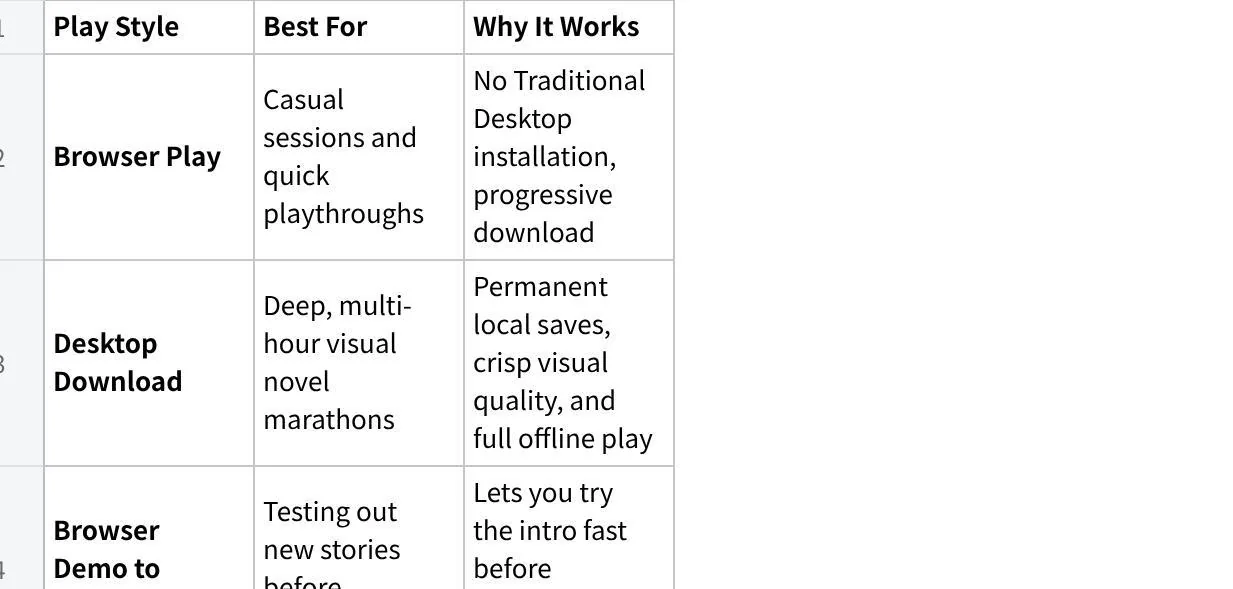
Some players love the pure convenience of launching a Ren'Py browser game right in their web tab during a quick break. You click a link and can start playing without installing a desktop application.
Another part of the niche prefers to fully download the Desktop versions, which generally provide broader platform support, local filesystem saves, offline play, and fewer browser-specific restrictions.
Which direction actually suits your playing habits?
Honestly, it comes down to what makes you feel most comfortable as a gamer. Web versions are convenient when you want to try a game without installing it, though they still download assets and may store data on the device. On a shared device, be mindful of browser history and local saves. If you want to keep progress for months, export a backup or use a desktop build if one is available.
Final Thoughts
Do you really need to pick one format for every single story you read?
Not at all. A lot of gamers use a quick browser session to test out a new release and see if the writing actually hooks them. If the story turns out to be amazing, they may switch to a desktop build for a longer playthrough, if one is available.
I like this approach because it lets you enjoy HTML Games on your own terms without installing titles you might drop after ten minutes.
At the end of the day, there is no single right answer here. Pick whichever option matches your device and schedule, jump into the story, and enjoy reading on terms that work best for you.